
SHARED RACES
How Hop Earth multiplayer works
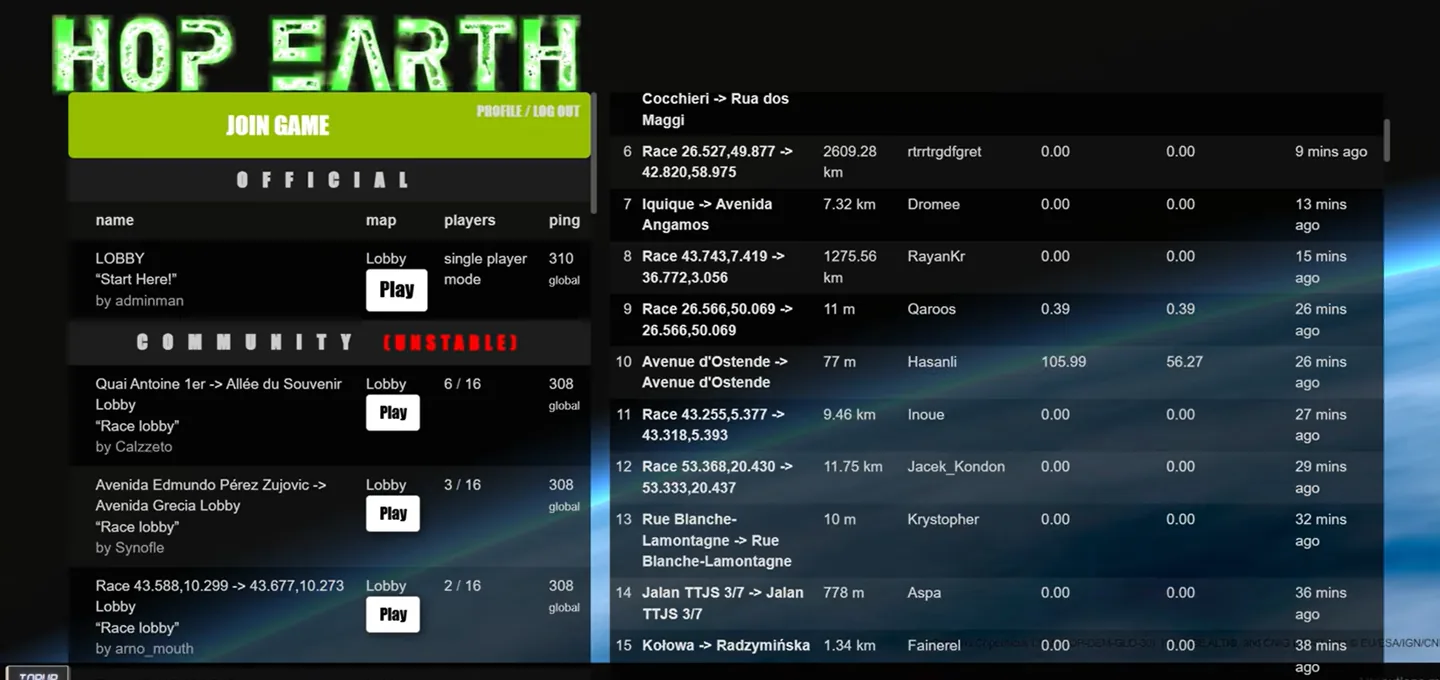
Hop.Earth supports shared sessions and custom races using real-world start and destination points. Build a stable solo drive first, then create or join a race and share the link supplied by the game.
Reviewed and updated August 25, 2026
Create a shared race
Load a stable location first
Confirm that the map and vehicle work before adding multiplayer state.
Open the current race flow
Use the live race interface; labels may change while the game develops.
Choose start and destination
Prefer connected mapped roads and avoid an overly long first route.
Share the race link
Send the generated race or session link to the other drivers.
Join a shared race
Open the shared link in a current desktop browser, allow the world to finish loading, and verify the expected race or destination before driving.
Plan a better race
Pick a route with a clear story: a mountain pass, coast road, river crossing, or compact city sprint. The route generator provides exact endpoints and approximate drive length.
Prepare a stable solo session before inviting players
Multiplayer adds shared state to every requirement of a normal drive, so prove the normal drive first. Sign in, choose the intended start, wait for road and terrain generation, summon a vehicle, and drive a short loop. Check the map and recovery control before opening the race flow. If this baseline fails, creating a shared link only gives every player the same unresolved account, graphics, map, vehicle, or focus problem. A successful solo loop narrows later failures to race creation, link sharing, participant access, or realtime connection state.
Ask other players to prepare independently as well. A current desktop browser, completed account flow, stable connection, and direct access to the official domain provide the most predictable setup. Mobile participants may be able to join, but experimental touch controls and memory limits add variables. For the first group test, use two players and a short route. Once that works, add participants or choose a longer road. Changing group size and route complexity together makes a failed session difficult to reproduce.
Create a route that works as a shared race
Choose endpoints on broad connected vehicle roads and keep the first race compact. A recognizable city sprint, coast segment, or simple highway connection is easier than a remote pass with complex elevation. Copy the start, destination, and coordinates before opening the live race interface. Place the start where every participant can load and orient the vehicle safely. Avoid beginning inside a tight junction, tunnel, water edge, or location where the solo car was slow to appear.
Use the race or session link generated by the current official interface. Do not edit its parameters, reuse an old link after creating a replacement, or assume a normal place URL carries the same shared state. Send the complete current link through the group’s chosen channel and tell participants which start and destination they should see. If someone opens a different location or no race state, stop and resend the latest link rather than continuing with mismatched sessions.
Troubleshoot join and synchronization failures
When one player cannot join, test that player’s link in a current browser and confirm sign-in finishes before the world loads. When nobody can join, create one fresh short race after a brief wait. When players join but see different states, compare the visible destination and link rather than relying only on voice chat. If solo play works for everyone but the shared session repeatedly fails, temporary multiplayer or realtime service pressure is more plausible than a graphics problem.
Collect safe evidence before reporting the issue: approximate time and timezone, number of players, desktop or mobile, direct official access, whether solo play worked, whether a fresh link changed the result, and the stage where synchronization stopped. Do not publish private account information or a link that grants access to an active session. A short reproducible race is more useful than a long story about several changing routes. It allows the same multiplayer path to be tested again with fewer unrelated variables.
Set simple rules for a smoother shared race
Agree on the start procedure before sharing the link: every player signs in, waits for the same destination, confirms a visible vehicle, and announces readiness before anyone drives. Decide whether resets are allowed and what happens when one participant disconnects. Keep the first result informal because generated terrain, loading time, device performance, and route differences can affect fairness. After a successful race, reuse the preparation routine but create a new official session link for the next route. Clear shared expectations reduce false starts and make actual synchronization problems easier to recognize. For repeat races, keep a short record of the route, participant count, and whether anyone needed to reconnect.
How Hop Earth multiplayer works field notes
Prove solo play first
Load one location, spawn a vehicle, and drive for a short distance before opening a shared session. This confirms that account, graphics, map data, focus, and vehicle controls work independently of multiplayer state.
Build a compact first race
Choose start and destination points on clearly connected roads and keep the first drive short. A compact route loads faster, gives every player time to join, and makes a broken shared link easier to distinguish from a route-generation issue.
Share only the current session link
Use the link produced by the live race interface and ask players to open it in a current desktop browser. If the session expires or becomes inconsistent, create a fresh race rather than editing parameters by hand.
For the next step, compare the current Hop Earth controls, choose a reviewed route, or follow the loading and graphics checklist.
DIRECT ANSWERS
FAQ: How Hop Earth multiplayer works
Does Hop Earth have multiplayer?
The project includes multiplayer game-server support and shared race behavior in the official browser experience.
How do I race friends in Hop Earth?
Confirm solo play, open the current race flow, choose connected start and destination roads, then share the generated session link.
Why can a friend not join my race?
The link may be stale, the service may be under pressure, or the other player may have an account, browser, network, or loading problem.
What makes a good multiplayer route?
Use a compact route with clear connected roads, recognizable landmarks, and moderate terrain for the first shared test.
Can mobile players join Hop Earth multiplayer?
They may be able to join, but experimental touch controls and device performance make desktop the more reliable shared-race setup.
What should I do if solo works but multiplayer fails?
Wait briefly, create a fresh short race, resend the new link, and have every player open it directly in a current browser.