
REAL ROADS / BROWSER GAME
Play Hop Earth in your browser
Hop Earth turns mapped real-world roads into a generated 3D driving playground. Sign in, choose a place, call a vehicle, drive, race friends, and use this field guide for controls, route coordinates, mobile help, and current fixes.
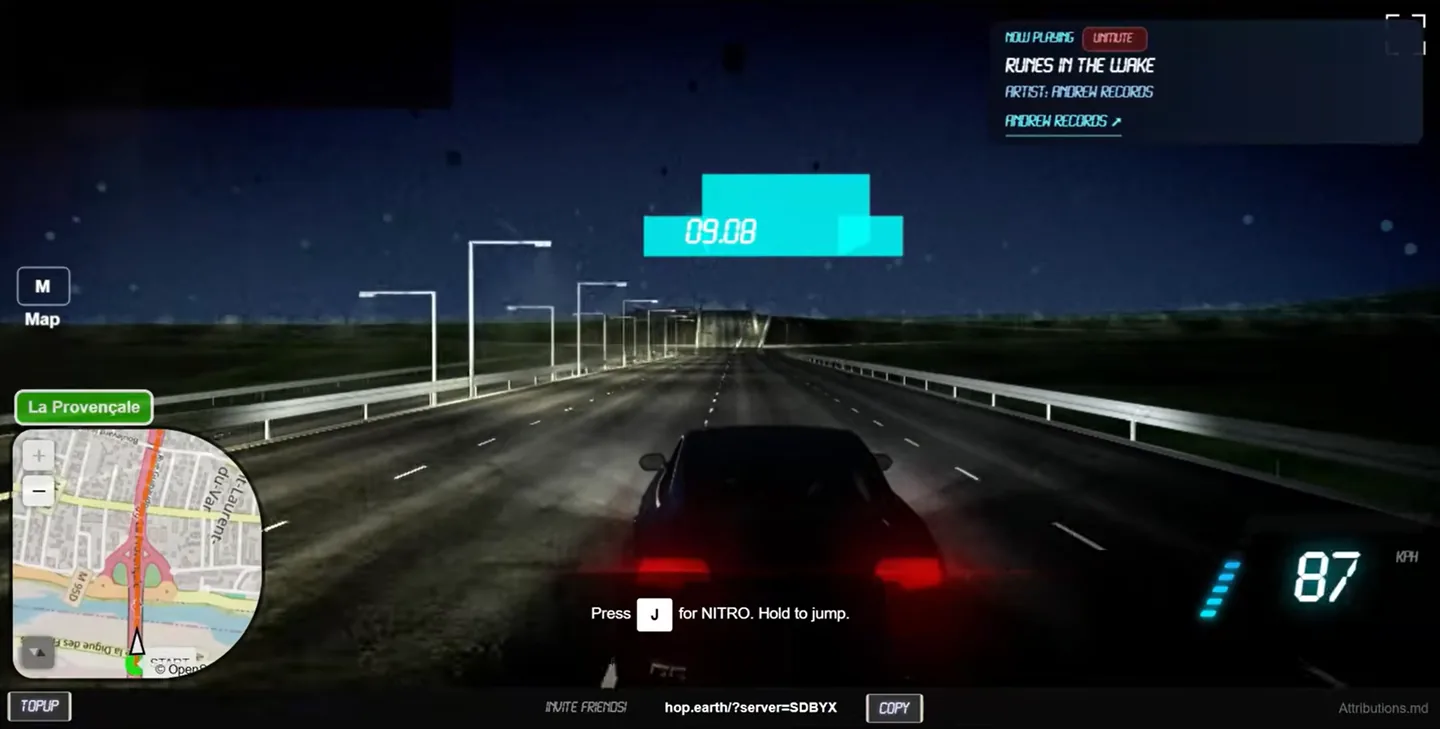
01 / SESSIONSign in
02 / SERVERUse Quick Play
03 / MAPPress M
04 / DRIVEClick to focus
CURRENT ACCESS STATUS
Hop Earth at a glance
Direct answers about the official browser game and this independent player guide.
| Question | Current answer |
|---|---|
| What is Hop Earth? | A browser driving game that builds a playable 3D world from mapped roads and elevation information. |
| Where can I play? | Open hop.earth in a separate browser tab. |
| Which map data is used? | The official repository identifies OpenStreetMap road geometry and processed global or regional elevation data. |
| Does it need a download? | No production installer is required. Use the official browser domain and avoid unofficial APK or EXE packages. |
| What is covered here? | Controls, routes, mobile guidance, multiplayer setup, map behavior, safe access, and symptom-led troubleshooting. |
START IN 60 SECONDS
Your first Hop Earth drive
Choose a connected road, wait for the generated world, summon the car, focus the player, and keep the opening route short.
Drop onto a road
Search for a recognizable place and allow road and terrain tiles to finish building.
02Summon a vehicle
Use the current live action and follow the recovery sequence if no vehicle appears.
03Focus, then drive
Click the game, accelerate with W/Z/Up, steer with A/D or arrows, and brake with S/Down.
PLAYER PLAYBOOK
Build a reliable Hop Earth session
Use a controlled setup before moving to long roads, difficult terrain, mobile play, or multiplayer races.
Start with a location that proves the basics
Choose a broad connected road in a familiar city and keep the first destination close. Wait until the road surface and surrounding terrain stop changing before calling the vehicle. A place label or map result can appear before every playable tile is ready. Avoid testing first on a tunnel, bridge approach, ferry connection, footpath, water edge, remote mountain track, or stacked interchange. Those locations introduce additional map and elevation variables. The first session should answer simple questions: did sign-in complete, did the world generate, did a vehicle appear, did the game receive keyboard focus, and could the car accelerate, brake, steer, and reset? Once those answers are yes, a more ambitious route becomes much easier to plan and troubleshoot.
Understand what the browser is generating
Hop Earth uses mapped road geometry and processed elevation information to create a playable 3D environment. The official public repository identifies OpenStreetMap as the road-data source and describes global or regional elevation inputs used by production. The result is generated geography rather than street-level photography. A familiar road may follow the expected direction while its width, camber, barriers, buildings, junction detail, or terrain transition differs from real life. Complex bridges, tunnels, coastlines, and multiple road levels can be especially difficult. Treat distances and route times as planning estimates, not exact navigation. Never use the game to make real travel, access, safety, or current road-condition decisions; authoritative navigation and local information are required outside the game.
Change one variable when something fails
If the world loads without a car, keep the browser and account unchanged while testing a simpler road. If the car appears but keys do nothing, keep the location unchanged, close search or chat, and click the driving view again. Keep the official game open in its own tab so account, fullscreen, storage, and keyboard focus stay under hop.earth. For a black or frozen viewport, update the browser, check hardware acceleration, close graphics-heavy tabs, and compare a private window. Reload only once before changing the test. Changing the account, browser, network, location, controls, and extensions together may produce a different result, but it will not reveal which factor mattered. A controlled comparison is faster and produces a useful report if the problem persists.
Choose the next guide from the symptom
Use the controls page when the vehicle exists but input, camera, map, reset, or interface actions are unclear. Use the missing-car guide when the generated world is visible but no usable vehicle appears. Use the broader troubleshooting page when sign-in, loading, graphics, or the entire scene fails. Open the mobile guide before depending on experimental touch controls, and prove a short solo drive before creating a multiplayer race. The map guide explains why source geometry and elevation can produce unexpected surfaces, while the download guide explains why the production game should be opened in a browser instead of through an unofficial APK, EXE, extension, or repackaged client. Matching the symptom to the right guide avoids destructive or unrelated fixes.
Keep the official game and this guide in separate tabs when troubleshooting. That makes it easier to compare controls or recovery steps without repeatedly leaving the session. If the official interface displays a newer prompt than the guide, follow the live prompt and note the difference. Active development can change a shortcut, mobile action, or race label before an editorial update is published.
THE USEFUL DIFFERENCE
Find a road worth driving
Choose a region, road style, difficulty, and drive time. Get a reviewed start, destination, and coordinate pair instead of a random pin.
Generate a route →CURRENT PAIN POINTS
Fix the thing blocking the drive
Hop Earth not working?
Separate browser, graphics, tab, network, and official-service failures.
VEHICLECar not spawning?
Check focus, road position, loading state, and the current summon action.
IPHONE / ANDROIDPlaying on mobile?
Understand the limits of experimental touch and fullscreen support.
RACE / SHARE LINKMultiplayer trouble?
Test solo play first, then isolate the race session and shared link.
DIRECT ANSWERS
Hop Earth FAQ
Do I need a Hop Earth account to play?
Yes. The current official service asks players to register or sign in before starting a driving session.
Does Hopearth.org host the game?
No. Hopearth.org is an independent player guide. Every Play Hop Earth button opens the official hop.earth game website in a separate browser tab.
Does Hop Earth use Google Maps?
No. The official public repository identifies OpenStreetMap road geometry and separately attributed elevation sources.
Can I play Hop Earth on mobile?
Mobile support is experimental. Landscape mode and a current browser help, while desktop keyboard play remains more reliable.
Why is the game not loading?
Test hop.earth directly, then check graphics acceleration, extensions, game focus, connection quality, and whether road data has finished loading.
Do I need to download Hop Earth?
No. The official production game runs in a browser at hop.earth, so avoid unofficial APK, EXE, extension, or mod packages.