
FIRST DRIVE
How to play Hop Earth
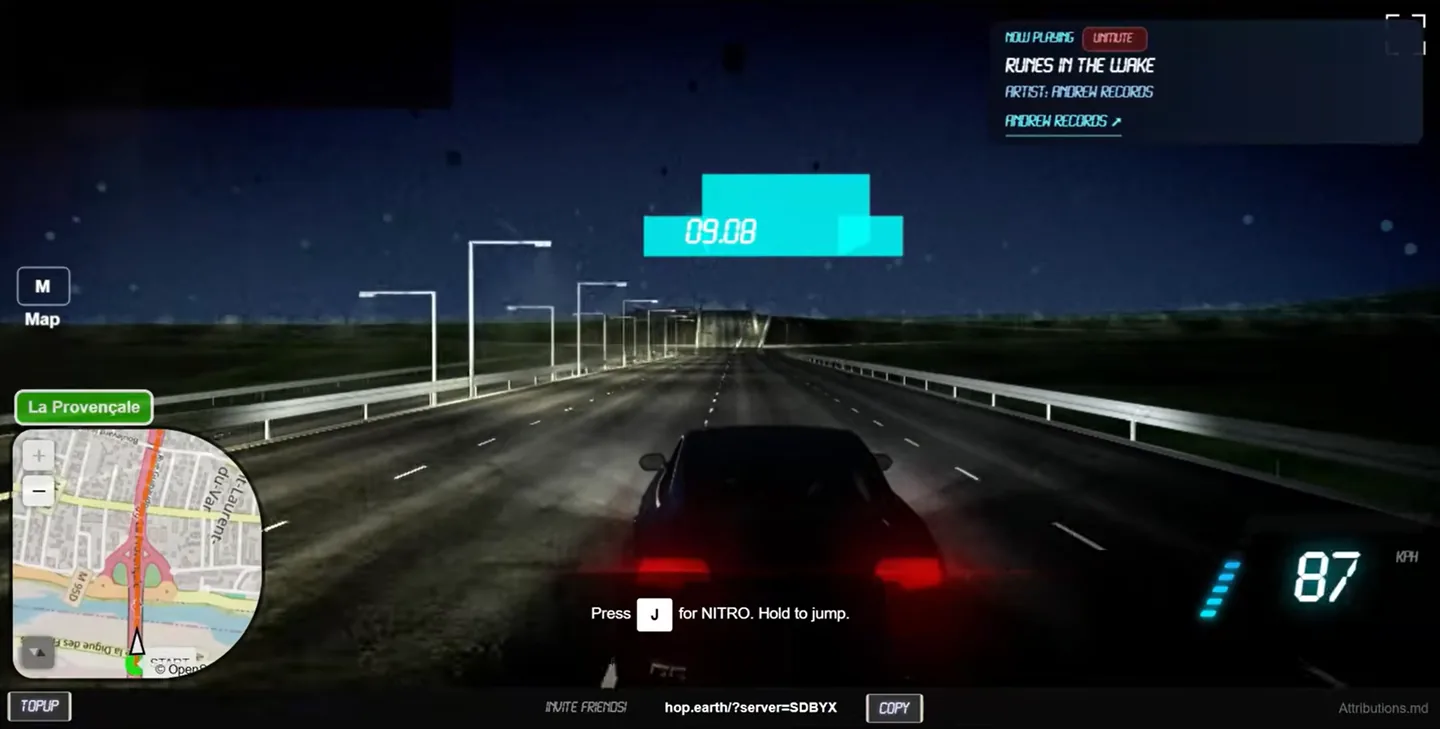
Open the browser game, sign in, search for a real place, land beside a road, summon a vehicle, focus the game, and begin with a short drive while the world finishes generating.
Reviewed and updated August 25, 2026
How to play Hop Earth in five steps
Open Hop.Earth and sign in
Load the official game as a full page and complete the current account flow.
Search for a location
Choose a familiar city or connected road for an easier first test.
Drop near a visible road
Land beside a connected road and allow both road and terrain tiles to appear.
Summon the car
Use the vehicle action displayed by the live game; desktop builds have used X.
Click inside, then drive
Focus the game frame before using the driving keys so the browser page does not capture them.
What the browser is building
Hop Earth turns mapped road geometry and elevation data into a generated driving world. Road width, terrain transitions, buildings, and roadside details are useful approximations rather than street-level photography.
Before you drive
What do you do in Hop Earth?
Pick a real place, generate the nearby road network, call a vehicle, drive, or join a shared race.
Do I need an account?
The current official service requires a Hop.Earth account before a driving session begins.
Why can the first load be slow?
The browser loads the game plus road and terrain data; server traffic, graphics support, and location complexity all matter.
Plan a first session that is easy to diagnose
A good first Hop Earth session is deliberately simple. Open the official site in a current desktop browser, finish the account flow, and choose a familiar city with broad connected roads. Avoid beginning on a remote track, ferry crossing, tunnel entrance, or stacked motorway interchange. Those places may be interesting later, but they introduce map and elevation variables before you know whether the basic session works. Keep the first destination only a few minutes away. The goal is to confirm the complete chain: sign-in, location search, road generation, terrain generation, vehicle access, keyboard focus, and movement.
Change only one variable when something fails. If the world loads but the car does not, keep the browser and account unchanged while testing a simpler road. If the car appears but keys do nothing, keep the location unchanged and refocus the game. If direct play works while an embedded player does not, continue on the official full-page site. This controlled approach is faster than repeatedly refreshing, changing browsers, changing locations, and pressing several controls at once. It also gives you a clear description if you later need to report a reproducible problem.
Understand the location-to-driving workflow
Location search is the beginning of world generation, not the final driving line. A place name can cover a district, town, landmark, or several similarly named results. After selecting a result, inspect the visible road network and place the start near the center of a connected vehicle road. Wait while road surfaces and terrain settle. A map label appearing does not always mean every playable tile is ready. Coordinates from the route generator are useful when a broad place-name search chooses the wrong side of a city or the wrong road with a similar name.
Once the start looks stable, summon or access the vehicle using the prompt shown by the current client. Click the driving view before pressing movement keys, because the browser, a search field, chat, or a menu may otherwise capture the input. Test acceleration, braking, and steering separately. Drive a short loop before opening the map or creating a race. A successful short loop proves that the core session is healthy and makes later route, camera, mobile, or multiplayer problems much easier to isolate.
Move from a test drive to a useful route
After the first loop, choose a route with a clear reason to drive it. Coastal roads offer visible direction changes, mountain roads test elevation and braking, city routes test junctions, and highways are useful for learning steering at speed. Start with an easy or medium route before using a hard mountain pass. Copy both endpoints and keep the coordinate pair available. Generated road geometry can differ from a normal navigation route, so treat real-world distance and estimated time as planning aids rather than promises about the exact in-game line.
Before a long drive, confirm the essential controls from the live help overlay and the controls page. Know how to brake, reset, return to the road, open the map, and release focus. If you plan to race friends, complete the route alone first. If you plan to use a phone, test mobile loading and the current summon control on a short road before committing to the full route. These small checks prevent a long setup from failing because of a basic focus, location, or compatibility issue.
How to play Hop Earth field notes
Choose the easiest possible first road
Start with a broad, connected road in a familiar city. A simple location makes it easier to tell whether the account, road tiles, terrain, vehicle spawn, and keyboard focus are working. Save mountain passes and multi-level junctions until one ordinary drive has succeeded.
Treat loading as part of the setup
Hop Earth is not streaming street photography. The browser receives mapped road geometry and terrain information, then builds a playable scene. Wait until the road surface and surrounding terrain stop changing before summoning a car or deciding that a location failed.
Use the live interface as the final authority
Hop Earth is actively developed, so a button label or shortcut can change. This guide records checked public behavior, while the help overlay and prompts inside the current official build remain the best confirmation for the session you are playing.
For the next step, compare the current Hop Earth controls, choose a reviewed route, or follow the loading and graphics checklist.
DIRECT ANSWERS
FAQ: How to play Hop Earth
Is Hop Earth free to play?
The official browser game can currently be opened at hop.earth. Account and service terms are controlled by the official site.
Do I need an account to play Hop Earth?
Yes. The current official flow asks players to register or sign in before beginning a driving session.
How do I start driving?
Choose a place, wait for road and terrain data, land near a connected road, summon a vehicle, click the game to focus it, then accelerate.
Why do the arrow keys scroll the page?
The game does not have keyboard focus. Click inside the official player or open it as a full page, then try the control again.
Can I drive any road in the world?
Many mapped roads can generate, but data quality, road type, terrain, browser performance, and service availability affect the result.
Where should a new player begin?
Use a broad connected city road with a short route. It is easier to load and troubleshoot than a complex interchange or remote track.